Brilliant Directories: Fixing Stripe Checkout Stuck on “Processing Request”
How a renamed cardholder field stopped new-member signup while saved-card and existing-member checkout kept working.
Jump to section
After customising a Brilliant Directories paid membership signup form, new-member checkout stopped at “Processing Request…”. The loading modal stayed open, the customer was not charged and signup did not finish. Trying different credit cards and clearing the browser cache made no difference.
Checkout for existing members, including purchases using saved cards, was still working. That distinction helped us narrow the investigation to the new-member paid signup flow rather than treating every Stripe transaction as broken.
At Ravensdale Digital Services, we traced the failure to a field variable in the customised whmcs_signup_paid form. The payment script expected the cardholder-name input to use first_name, but the form used cc_name. Restoring the expected variable allowed Stripe checkout to finish and the new member to reach the confirmation step.
The symptom: a checkout modal that never closed
The form looked usable: a new member could enter their details, add a card and submit the signup. The problem appeared after submission, when the processing overlay remained on screen without a visible explanation.
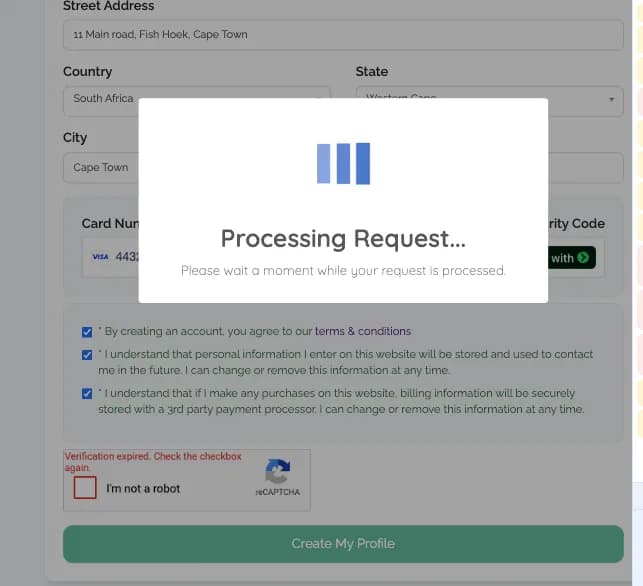
The stalled signup displayed “Processing Request…” indefinitely instead of a payment result or a useful error message.
The working existing-member and saved-card checkouts were an important comparison. A successful payment through those routes did not prove that the new-member form was valid. It showed that we needed to inspect the failing signup route separately.
Finding the error inside the network response
The browser Console initially showed unrelated extension warnings. The useful evidence came from Developer Tools → Network, where we inspected the requests made during the stalled checkout.
Three consecutive asynchronous requests went to /wapi/widget. All three returned 200 OK, but the response body of the final request contained the failure:
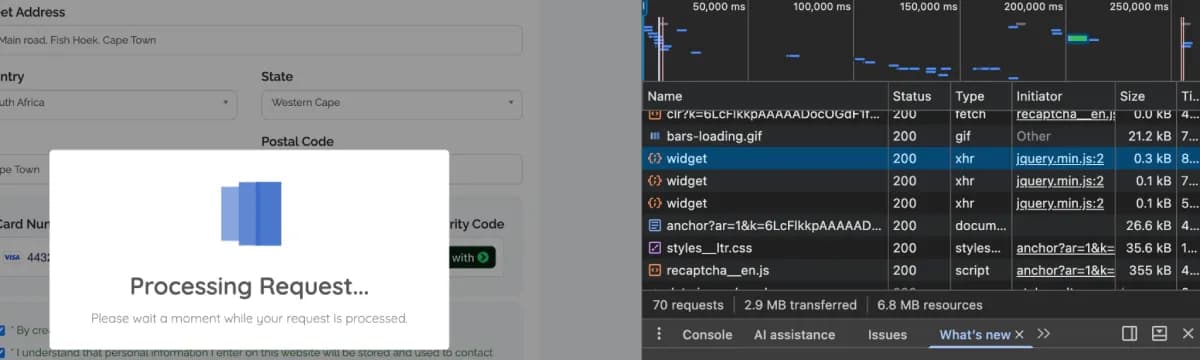
Successful HTTP responses from the widget endpoint appeared alongside a checkout that was still stuck.
{
  "action": "stripe_error",
  "errors": {
    "error": "TypeError: Cannot read properties of null (reading 'value')"
  }
}
The 200 OK status described the response from Brilliant Directories’ widget endpoint. It did not confirm a successful Stripe payment. In this case, the response recorded a JavaScript error from the payment flow.
That error gave us a specific question to investigate: which input was the payment script trying to read when it received null?
The cause: cc_name replaced the expected first_name input
The signup payment script looked for the card-name field through its HTML name attribute. The failing lookup was:
paymentFormSignUp.querySelector("input[name='first_name']").value;During form customisation, the Name on Card field had been assigned the database variable cc_name. The rendered form therefore had no matching input[name='first_name'] element for the script to read.
The failure followed this sequence:
- The script searched for the input named
first_name. - The selector returned
nullbecause the expected input was missing. - Reading
.valuefromnullraised the TypeError. - The payment flow stopped before submitting the card-tokenisation request to Stripe.
- The error was logged through
/wapi/widget, while the processing modal remained open.
This explained why changing cards did not help: the script failed while reading the form, before the new card reached the tokenisation step.
Restoring the field in Brilliant Directories Form Manager
We fixed the customised form by restoring the variable expected by the payment script:
- Open the Brilliant Directories Admin Dashboard.
- Go to Toolbox → Form Manager.
- Find the customised Member – Sign Up – Paid form,
whmcs_signup_paid, and open it for editing. - Locate the Name on Card / Cardholder Name field.
- Change its Database Variable from
cc_nameback tofirst_name. - Save the changes and test a new-member paid signup with a newly entered card.
The visible field label can still say “Name on Card” or “Cardholder Name”. The variable identifies the input to the payment script, so changing the label and changing the variable have different consequences.
There is also a distinction between the cardholder’s name and an additional member first-name field. Brilliant Directories’ checkout-field documentation states that first_name is already used for the card-name field on paid signup forms. If a separate member first-name field is needed there, it should use member_first_name to avoid a conflict.
The result: payment and new-member confirmation
Once first_name was restored, the payment script found the expected input, read its value and continued with Stripe tokenisation. The new-member checkout then reached the payment confirmation step.
The successful checkout confirmed payment and showed that the new account had been created and was awaiting approval.
The outcome was specific: the previously failing new-member signup now worked. Existing-member and saved-card checkout had already been working, which is why testing those routes alone would have missed the form problem.
What to check when customising paid signup forms
This incident left us with three checks that matter when editing a Brilliant Directories checkout:
- Keep required field variables intact. Update visible labels without renaming the inputs that the payment script expects. On this paid signup form, the card-name field needed
first_name. - Read the response body. A
200 OKfrom/wapi/widgetcan accompany an error payload. Inspect the action and error details before treating the request as a successful payment. - Test each checkout route. New-member signup with a new card, existing-member checkout and saved-card purchases exercise different paths. Success in one path does not establish that the others work.
For custom checkout widgets, error handling should also dismiss the loading overlay and show a useful message when client-side processing fails. In this case, the persistent spinner concealed the field error that the network response exposed.
Need help with Brilliant Directories checkout?
Ravensdale Digital Services troubleshoots Brilliant Directories payment flows, membership signup forms and custom widget conflicts. If your checkout hangs on “Processing Request…” or behaves differently for new and existing members, contact our team to discuss the failing flow.
You can also explore our Brilliant Directories development and support services.
Need help with Brilliant Directories checkout?
Ravensdale Digital Services troubleshoots Stripe payment flows, paid membership signup forms and custom widget conflicts in Brilliant Directories.