WordPress vs Next.js: Which Is Better for Your Business Website?
How to choose between a content-friendly CMS and a modern React framework based on budget, editing needs, SEO, performance, integrations, and long-term growth.
Jump to section
Choosing between WordPress and Next.js can feel like choosing between two different worlds.
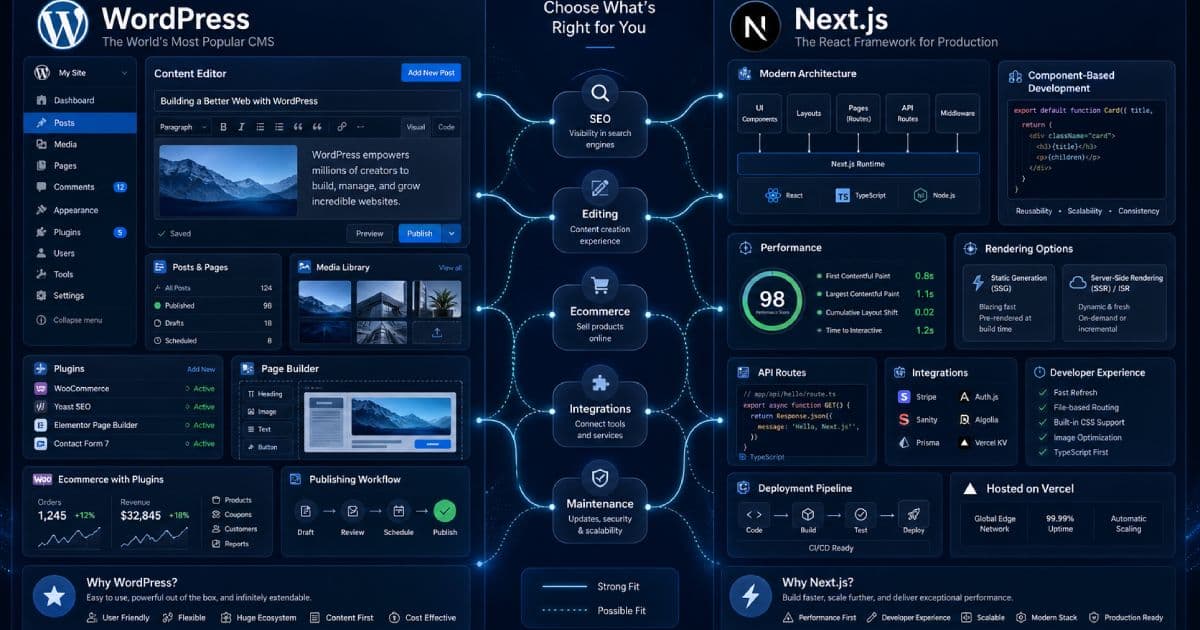
WordPress is a mature content management system. It gives business owners, marketers, and editors a familiar dashboard for managing pages, posts, media, menus, plugins, forms, ecommerce, SEO tools, and website content.
Next.js is a modern React framework. It is usually chosen when a business website needs stronger front-end control, excellent performance architecture, custom user experiences, app-like features, API integrations, or a headless CMS setup.
Neither option is automatically better.
The right choice depends on the job your website needs to do, who will maintain it, how much custom functionality you need, how important content editing is, and how much technical support you have after launch.
Quick answer
For many small and medium-sized businesses, WordPress is the better fit when the website is mainly content-managed: service pages, blog posts, landing pages, team pages, case studies, forms, basic ecommerce, and regular marketing updates.
Next.js is usually the better fit when the website needs custom interfaces, strong performance control, complex integrations, app-like functionality, structured content, dashboards, portals, calculators, quote flows, or a more bespoke front-end experience.
A third option is also possible: headless WordPress with Next.js. In that setup, WordPress manages the content and Next.js powers the front end. This can work well, but it adds complexity and should only be used when the benefits justify the build and maintenance effort.
WordPress vs Next.js at a glance
| Factor | WordPress | Next.js |
|---|---|---|
| Best for | Content-managed business websites, blogs, brochure sites, WooCommerce stores, marketing sites | Custom websites, SaaS-style interfaces, web apps, high-performance front ends, API-driven builds |
| Editing experience | Strong built-in admin dashboard | Needs a CMS or custom admin interface |
| Developer requirement | Lower for standard sites; higher for custom themes/plugins | Higher from the start |
| Design flexibility | Good with custom themes; can be limited by theme/plugin choices | Very high front-end control |
| SEO | Strong when configured properly | Strong when implemented properly |
| Performance | Can be fast, but depends on hosting, theme, plugins, and optimisation | Can be very fast, but still depends on implementation and hosting |
| Maintenance | Updates, plugins, security, backups, hosting | Framework updates, hosting, dependencies, deployment, CMS/API maintenance |
| Ecommerce | Strong with WooCommerce for many store types | Usually needs Shopify, WooCommerce headless, custom commerce, or another backend |
| Integrations | Many plugins and APIs available | Custom integrations are often cleaner but require development |
| Ownership | Strong if self-hosted and maintained properly | Strong if code, hosting, CMS, and deployment are controlled |
| Risk | Plugin bloat, poor themes, weak maintenance | Developer dependency, over-engineering, CMS complexity |
| Best business question | “Do we need easy content management?” | “Do we need custom product-like functionality?” |
What WordPress is best at
WordPress is best when the business needs a website that non-technical users can update.
That matters more than many people realise.
A business website usually changes often. You may need to update services, prices, team members, blog posts, case studies, testimonials, landing pages, forms, menus, SEO titles, images, and contact details. WordPress gives you an admin dashboard designed around publishing and content management.
WordPress is a strong choice for:
- Business websites
- Service company websites
- Blogs and resource hubs
- Local SEO websites
- Portfolio websites
- Membership websites
- Directory websites
- WooCommerce stores
- Content-heavy sites
- Marketing landing pages
- Small business sites with regular updates
- Businesses that want internal staff to manage content
WordPress can also be extended through themes, plugins, custom post types, custom fields, REST API integrations, and custom development.
Where WordPress can go wrong
WordPress problems usually come from poor implementation, not from WordPress itself.
Common issues include:
- Bloated page builders
- Too many plugins
- Poor hosting
- Unmaintained themes
- Slow images
- Weak security
- Broken updates
- Plugin conflicts
- Poor content structure
- No staging environment
- No backup strategy
- Messy custom code
- Weak technical SEO setup
A badly built WordPress site can become slow, fragile, and difficult to maintain. A well-built WordPress site can be fast, secure, flexible, and easy for the business to manage.
The difference is planning and execution.
What Next.js is best at
Next.js is best when the website behaves more like a custom digital product than a standard content website.
It gives developers strong control over the front end, routing, rendering, performance architecture, components, integrations, and deployment workflow.
Next.js is a strong choice for:
- Custom business websites
- SaaS marketing sites
- Web applications
- Client portals
- Dashboards
- Calculators and interactive tools
- Quote builders
- Search-driven platforms
- Multi-step forms
- API-heavy websites
- Headless CMS websites
- High-performance landing pages
- Custom ecommerce front ends
- Websites with complex design systems
Next.js can be excellent when a business wants something more tailored than a theme-based CMS build.
Where Next.js can go wrong
Next.js can be the wrong choice when it is used to impress developers rather than solve a business problem.
Common risks include:
- Over-engineering a simple website
- No easy editing interface for the client
- Higher build cost
- Higher developer dependency
- More complex hosting and deployment
- Content updates requiring code changes
- Poorly planned CMS integration
- Technical SEO mistakes during implementation
- Unclear maintenance responsibilities
- Rebuilding features WordPress already handles well
A simple five-page business website does not automatically need Next.js. If the owner only needs to update pages and publish occasional articles, WordPress may be faster, cheaper, and easier to manage.
The SEO comparison
Both WordPress and Next.js can perform well in search.
Neither guarantees SEO results.
SEO depends on the quality of the implementation, content, structure, internal links, metadata, indexability, page speed, schema, redirects, and user experience.
| SEO area | WordPress | Next.js |
|---|---|---|
| Page titles and meta descriptions | Easy with SEO plugins | Strong with metadata APIs if implemented properly |
| XML sitemaps | Usually plugin-generated | Usually custom or framework-generated |
| Schema markup | Plugin-based or custom | Custom JSON-LD or CMS-driven |
| Redirects | Plugin, server, or hosting-level | Framework, hosting, or middleware-level |
| Blog publishing | Built in | Requires CMS or Markdown/content system |
| Internal linking | Easy through editor | Needs content workflow or components |
| Technical control | Good, but affected by themes/plugins | High, but developer-dependent |
| Performance SEO | Requires optimisation | Strong potential, but not automatic |
| Content velocity | Strong for teams | Depends on CMS setup |
For content-heavy SEO campaigns, WordPress is often easier because publishing is built in. For custom SEO architecture, programmatic landing pages, fast landing pages, or structured content systems, Next.js can be powerful if the development team knows what they are doing.
The performance comparison
Next.js often has the advantage when performance is planned properly from the start. It gives developers more control over component structure, rendering, image handling, JavaScript, caching, and deployment.
But performance is not automatic.
A Next.js site can still be slow if it ships too much JavaScript, loads heavy third-party scripts, uses poor images, relies on slow APIs, or ignores caching.
WordPress can also be fast when it uses:
- Good hosting
- A lightweight theme
- Sensible plugins
- Image compression
- Caching
- CDN support
- Database optimisation
- Limited third-party scripts
- Clean templates
The honest comparison is not “WordPress is slow and Next.js is fast”. The better comparison is:
| Website build | Likely performance outcome |
|---|---|
| Bloated WordPress theme with many plugins | Often slow and hard to optimise |
| Lightweight custom WordPress build | Can be fast and reliable |
| Poorly built Next.js site | Can still be slow and complex |
| Well-built Next.js site | Can be very fast and scalable |
The editing experience
This is one of the most important business differences.
WordPress includes a dashboard for managing content. That makes it attractive for business owners, marketers, editors, and admin staff.
Next.js does not include a built-in CMS. Content editing must come from somewhere else, such as:
- Markdown files
- A headless CMS
- WordPress as a headless CMS
- Sanity
- Contentful
- Strapi
- Payload CMS
- Directus
- Custom admin dashboards
- Database-driven content tools
That extra flexibility can be useful, but it also adds planning decisions.
Ask this before choosing Next.js:
> Who will update the website after launch, and how?
If the answer is “the client needs to update pages themselves every week”, do not build a Next.js site without a clear CMS plan.
The cost comparison
WordPress is usually more cost-effective for standard business websites. Next.js is usually more expensive at the start because it needs more custom development, deployment planning, and often a CMS integration.
These are broad planning ranges, not fixed quotes.
| Project type | WordPress budget tendency | Next.js budget tendency |
|---|---|---|
| Basic brochure website | Lower | Often unnecessary unless design or performance requirements justify it |
| Content-heavy blog or resource hub | Lower to medium | Medium to high depending on CMS setup |
| Custom marketing website | Medium | Medium to high |
| Ecommerce store | Medium with WooCommerce | High if custom or headless |
| Web app or portal | Often limited unless heavily customised | Strong fit, higher budget |
| Interactive calculators/tools | Possible, but may be awkward | Strong fit |
| API-driven platform | Possible with custom development | Strong fit |
| Headless content platform | Medium to high | Medium to high |
Security and maintenance
Both WordPress and Next.js need maintenance.
WordPress maintenance usually includes:
- Core updates
- Plugin updates
- Theme updates
- Backups
- Malware scanning
- Security hardening
- Spam protection
- Database optimisation
- User role management
- Plugin conflict testing
- PHP and hosting compatibility
Next.js maintenance usually includes:
- Framework updates
- Package updates
- Dependency security checks
- Hosting and deployment monitoring
- Build pipeline maintenance
- CMS/API maintenance
- Environment variable management
- Performance monitoring
- Error logging
- Security headers
- Form and API protection
WordPress security risks often come from outdated plugins, weak passwords, poor hosting, or poorly maintained sites. Next.js security risks often come from custom code, exposed APIs, weak authentication, dependency issues, or misconfigured hosting.
Neither option should be launched and forgotten.
Ecommerce: WooCommerce, Shopify, or custom?
If ecommerce is important, the decision becomes more specific.
WordPress with WooCommerce can be a good fit for:
- Small to medium stores
- Content-led ecommerce
- Stores that need WordPress publishing
- Flexible product content
- Local payment gateway setups
- Custom checkout improvements
- Stores with manageable product complexity
Next.js can be a good fit for ecommerce when:
- You need a custom storefront
- You are using Shopify as the backend
- You need headless commerce
- You need very custom product discovery
- You need a faster front end for a larger store
- You have complex integrations
- You have the budget for ongoing development
For many SMEs, WooCommerce or Shopify is more sensible than building a custom ecommerce system from scratch. Next.js becomes more attractive when the front-end experience or integration layer needs to be highly customised.
Content marketing and blogging
If your business depends heavily on publishing, WordPress has a clear advantage.
It gives you:
- Posts
- Pages
- Categories
- Tags
- Authors
- Media library
- Drafts
- Revisions
- Scheduled publishing
- User roles
- Editorial workflows
- SEO plugin support
- Easy internal linking
Next.js can support excellent content marketing, but the editing workflow must be built or connected. For a developer-led team, Markdown or a headless CMS may be fine. For a marketing-led team, WordPress may be more comfortable.
The hidden cost of Next.js content is not the rendering. It is the publishing workflow.
Integrations and automation
Both platforms can integrate with other systems.
WordPress often integrates through plugins, webhooks, REST API, forms, WooCommerce extensions, CRM plugins, email marketing plugins, and automation tools.
Next.js often integrates directly with APIs, databases, authentication providers, CRMs, payment systems, analytics tools, email platforms, and custom backends.
| Integration type | WordPress fit | Next.js fit |
|---|---|---|
| Basic contact forms | Strong | Strong |
| Email marketing | Strong through plugins | Strong through APIs |
| CRM integration | Good with plugins or custom work | Strong with custom API work |
| Payment gateway | Strong with WooCommerce/plugins | Strong but usually custom or via provider SDK |
| Booking systems | Strong with plugins | Strong if custom UX is needed |
| Client portals | Possible, but can become plugin-heavy | Strong fit |
| Dashboards | Possible, but not ideal for complex needs | Strong fit |
| Custom workflows | Possible with custom development | Strong fit |
If the integration can be handled safely with a reliable plugin, WordPress may be faster. If the integration is central to the business workflow and needs custom rules, Next.js may be cleaner. For deeper workflow connections, plan automation and integrations as part of the build, not as an afterthought.
Headless WordPress with Next.js
Headless WordPress means WordPress manages the content, while Next.js displays the front end.
This can be a strong combination when:
- Editors like WordPress
- Developers need front-end control
- The site needs better performance architecture
- The design system is custom
- Content is reused across multiple channels
- The business needs a more modern front end without losing WordPress publishing
But headless is not always worth it.
It adds complexity around:
- Previewing content
- Authentication
- Menus
- Forms
- Search
- SEO metadata
- Redirects
- Image handling
- Plugin compatibility
- Hosting
- Deployment
- Editorial training
Decision guide: choose WordPress if...
WordPress is probably the better choice if:
- You need a business website quickly
- Your team needs to edit content easily
- You plan to publish blog posts or resources often
- You need service pages and local SEO pages
- You want a familiar admin dashboard
- You need WooCommerce
- Your budget is moderate
- You want plugins for common features
- You do not need complex custom functionality
- You want a site that a marketing team can manage
WordPress is especially strong for SMEs that need a reliable website, SEO content, forms, landing pages, service pages, and regular updates without needing a developer for every content change.
Decision guide: choose Next.js if...
Next.js is probably the better choice if:
- You need a custom user experience
- Your website behaves like a web app
- You need dashboards, portals, tools, or calculators
- You need complex API integrations
- You have a custom design system
- Performance architecture is a major priority
- You have developer support available
- You are using a headless CMS
- You need structured content across multiple channels
- Your business wants a more product-like digital platform
Next.js is a strong choice when the website is not just a website. It becomes part of the business system.
Decision guide: consider both if...
A hybrid approach may be worth considering if:
- You want WordPress editing with a custom Next.js front end
- Your current WordPress site has content value but needs a better front end
- You need stronger performance without losing editorial control
- You want to separate content management from presentation
- Your team has the budget and technical support to maintain both layers
This can be a good long-term architecture, but it should be planned carefully.
Common mistakes businesses make
Avoid these mistakes:
- Choosing Next.js just because it sounds modern
- Choosing WordPress just because it is familiar
- Ignoring who will update the website
- Building a custom site with no CMS
- Using too many WordPress plugins
- Rebuilding a WordPress site without redirects
- Ignoring hosting and maintenance costs
- Treating SEO as a plugin setting
- Choosing a platform before defining requirements
- Forgetting forms, tracking, analytics, backups, and security
- Overbuilding the first version
- Underbuilding a website that is central to sales
The Ravensdale view
For most standard SME websites, WordPress remains a very strong choice. It is flexible, familiar, cost-effective, and well suited to content-managed business websites.
For custom builds, high-performance front ends, web applications, portals, dashboards, calculators, structured content systems, and integration-heavy projects, Next.js is often the stronger option. If the backend workflow is the main complexity, a framework such as Laravel may also be worth considering.
The decision should be based on the business case, not developer fashion.
If the website needs to be edited by non-technical users every week, WordPress or a CMS-backed approach is important. If the website needs to behave like a custom product, Next.js may be worth the investment.
Final verdict
Choose WordPress when content management, publishing, speed of setup, and budget efficiency matter most.
Choose Next.js when custom functionality, performance control, front-end flexibility, and integration architecture matter most.
Choose headless WordPress with Next.js only when you genuinely need both: WordPress for editing and Next.js for a custom front end.
The best platform is the one your business can launch, maintain, improve, and grow without creating unnecessary technical debt.
Sources and further reading
- WordPress.org features
- WordPress Developer Resources
- WordPress REST API Handbook
- Next.js App Router documentation
- Next.js metadata and OG images documentation
- Next.js image optimisation documentation
Need help choosing the right website platform?
Ravensdale Digital Services can help you decide whether your business website should be built with WordPress, Next.js, WooCommerce, Shopify, Laravel, or a custom stack.
We can also help you rebuild an existing website without losing SEO value, improve performance, plan content structure, and connect your site to the tools your business already uses.
FAQs
Is Next.js better than WordPress?
Not always. Next.js is better for custom front ends, web apps, dashboards, portals, API-driven sites, and performance-focused builds. WordPress is often better for content-managed business websites, blogs, service pages, and marketing teams that need an easy editing dashboard.
Is WordPress outdated?
No. WordPress is still widely used and actively developed. The problem is not WordPress itself, but poor implementation, slow themes, plugin bloat, weak hosting, and poor maintenance.
Is Next.js good for SEO?
Yes, Next.js can be excellent for SEO when implemented properly. It supports strong metadata control, structured layouts, fast pages, image optimisation, and flexible rendering. But SEO still depends on content, crawlability, internal linking, metadata, redirects, schema, and technical execution.
Can I use WordPress and Next.js together?
Yes. WordPress can be used as a headless CMS while Next.js powers the front end. This can be powerful, but it adds complexity around previews, forms, menus, metadata, redirects, hosting, and maintenance.
Which is cheaper: WordPress or Next.js?
WordPress is usually cheaper for standard business websites because content management and many common features are already available. Next.js usually costs more at the start because it requires more custom development and often a separate CMS setup.
Which platform is better for a small business website?
For many small businesses, WordPress is the better starting point because it is easier to edit, cost-effective, and suitable for service pages, blog content, forms, and local SEO. Next.js is better when the small business needs custom functionality or a more app-like experience.
Which platform is better for ecommerce?
For many SMEs, WooCommerce on WordPress or Shopify is more practical than a custom ecommerce build. Next.js can be a strong ecommerce front end when paired with Shopify, WooCommerce headless, or another commerce backend, but it usually requires a larger budget and stronger technical support.
Should I rebuild my WordPress website in Next.js?
Only if there is a clear business reason. Good reasons include performance architecture, custom UX, complex integrations, headless content needs, or app-like functionality. Do not rebuild purely because Next.js sounds more modern.
Need help choosing the right website platform?
Ravensdale Digital Services can help you decide whether your business website should be built with WordPress, Next.js, WooCommerce, Shopify, Laravel, or a custom stack. We can also help you rebuild an existing website without losing SEO value, improve performance, plan content structure, and connect your site to the tools your business already uses.