BigCommerce Subscriptions with PayWhirl Native Checkout: CoffeeUSA Case Study
Native checkout, Braintree card storage and selling plans for each storefront, with a custom Cornerstone Light purchase area for retail and wholesale buyers.
Jump to section
Coffee USA serves two buying patterns from the same catalogue: bulk orders from B2B customers such as cafés and hotels, and smaller purchases from home consumers. Both groups return for coffee and tea, but their pack sizes and replenishment needs differ.
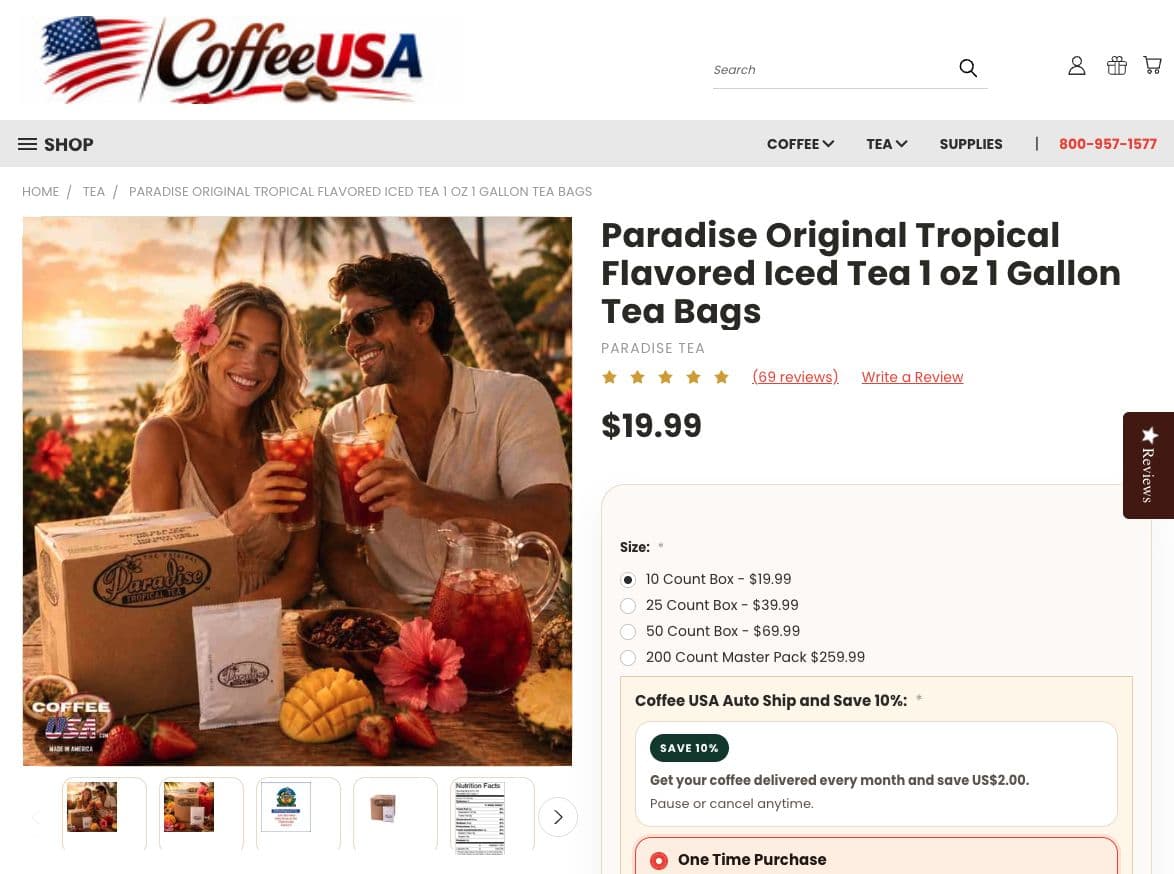
At Ravensdale Digital Services, we implemented PayWhirl subscriptions through BigCommerce Native Checkout using the Selling Plans API. Customers choose a one-time purchase or “Auto Ship and Save 10%” on the product page, then pay through BigCommerce’s standard Optimized One-Page Checkout without a third-party checkout redirect.
The implementation involved more than displaying a subscription option. Coffee USA had to switch its payment method to Braintree to support stored credit cards for recurring payments. Its multi-store BigCommerce setup also shared inventory across storefronts, while the PayWhirl setup operated on an individual-store basis. We resolved that mismatch with separate selling plans for each store.
We customised the Cornerstone Light Stencil theme around these requirements, bringing pack sizes, subscription choices, prices and purchase controls into a clearer buying flow. Following deployment, the store’s sales reporting showed a 21.9% increase in average order value (AOV) over its previous comparison period.
CoffeeUSA’s Paradise iced tea product page, captured on 3 October, showing the customised purchase area.
Implementing PayWhirl with BigCommerce Native Checkout
For Coffee USA, we used PayWhirl’s native selling plans attached to existing BigCommerce products. The purchase decision happens on the product page; the transaction stays in BigCommerce’s checkout.
That means a customer can put a recurring tea order and a one-time purchase of coffee filters in the same cart. BigCommerce handles checkout, shipping and tax calculations, while PayWhirl manages the subscription schedule and recurring order process. PayWhirl’s BigCommerce integration documentation confirms support for these mixed carts.
We configured the auto-ship offer with a monthly renewal and a 10% subscription saving, while retaining the one-time purchase choice. A café replenishing supplies can choose recurring delivery; a home customer trying a blend can buy it once through the same purchase form.
The labels show both the saving and the recurring commitment. “Auto Ship and Save 10%” sits alongside the monthly renewal terms, so the offer communicates how the customer will be billed as well as the price benefit.
Switching to Braintree for stored credit cards
Recurring billing needs a payment method that can be saved and charged again. Coffee USA’s payment setup had to change to support that requirement, so the client switched to Braintree to allow credit card storage.
With stored credit cards enabled, the native checkout flow can save a tokenised payment method for subsequent subscription charges. Card vaulting happens through the supported payment infrastructure; our theme customisation handles the purchase interface. PayWhirl’s native selling-plan requirements identify payment-method vaulting as a prerequisite and list Braintree as a supported option.
This was a dependency of the implementation. Making a subscription card visible on a product page would not, by itself, provide the stored payment method needed for monthly renewals.
Separate selling plans across stores with shared inventory
Coffee USA used a multi-store BigCommerce plan with inventory shared among different stores. The same stock could serve multiple storefronts, but the PayWhirl integration we implemented worked on an individual-store basis.
Our workaround was to set up different selling plans for each store. Each storefront received its own subscription configuration for the products sold there, while inventory continued to be shared through BigCommerce.
Shared stock did not make a subscription plan available automatically in every store. The plan setup had to be handled for each storefront so customers could select the recurring offer in the store where they were shopping. This distinction between shared inventory and store-specific subscription configuration was one of the main implementation challenges.
Customising the PayWhirl UI in Cornerstone Light
Coffee USA’s storefront uses BigCommerce’s Cornerstone Light theme. We customised its Stencil product purchase area to bring the native subscription selector into the existing pack-size and quantity flow.
The starting interface made the auto-ship offer easy to miss. Giving it more space exposed overlapping radio indicators, crowded wording and uneven product metadata. We rebuilt the presentation around two distinct selectable cards:
- One Time Purchase: a single order without a subscription.
- Auto Ship and Save 10%: monthly recurring delivery with the configured saving.
The active card uses an accent border and background highlight. The choices remain mutually exclusive, with the selected purchase type visible before the customer adds the item to the cart. A warm container background and a compact “Save 10%” badge connect the offer to the rest of the storefront.
The Stencil work centred on the product-view purchase area and its client-side option handling. On products such as Paradise Original Tropical Flavored Iced Tea 1 oz 1 Gallon Tea Bags, pack selection changes the price that the subscription saving must reflect. We tied the subscription price display to product option changes so the 10% saving updates against the selected pack without a page reload.
That matters for Coffee USA’s buyers: a single-pack retail purchase and a multi-pack wholesale order should each show the subscription price for the option being selected. The interface needs to carry the chosen pack and selling plan together into the cart.
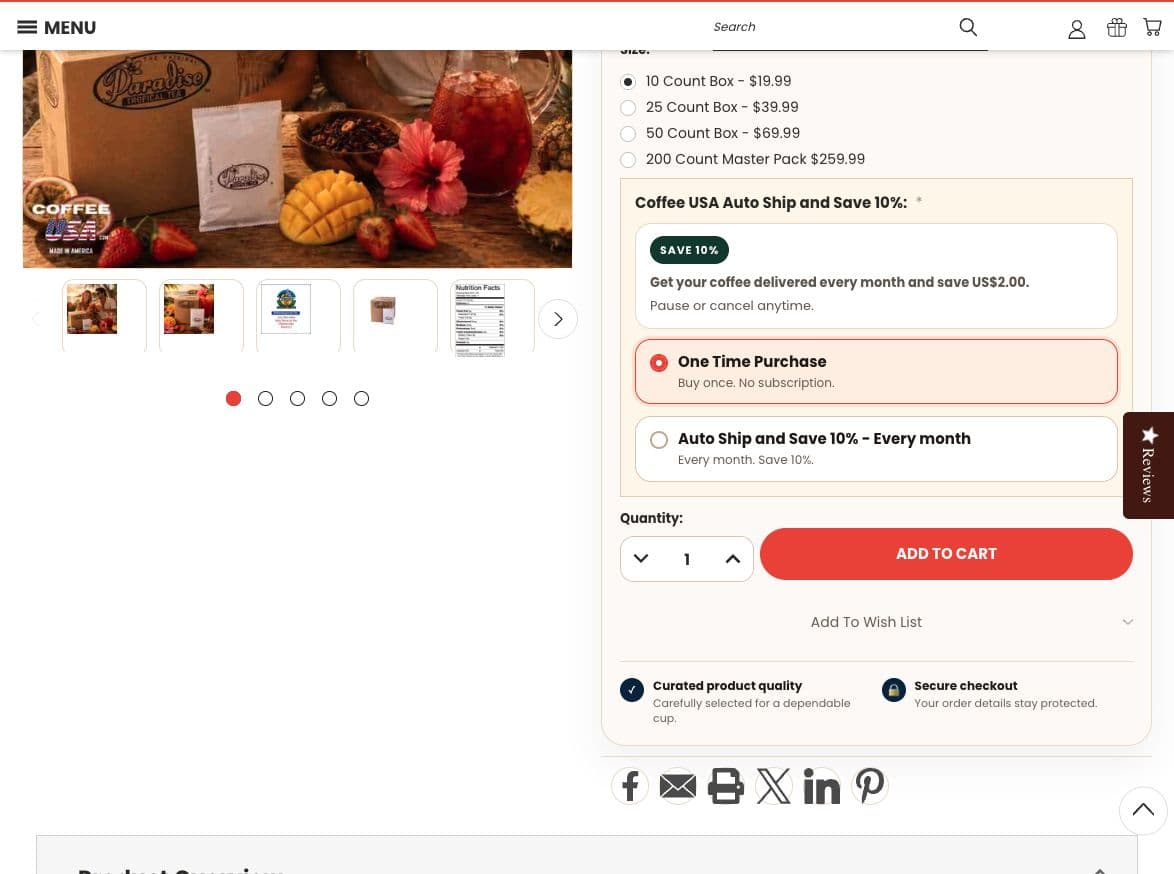
The one-time and auto-ship cards sit above the quantity selector and Add to Cart button, with the recurring saving visible at the point of selection.
Bringing pack size, quantity and Add to Cart together
We arranged the product controls in the order Coffee USA’s customers use them: select the pack size, choose one-time purchase or auto-ship, set the quantity and add the item to the basket.
For wholesale buyers, pack size and quantity represent different decisions. A larger case configuration determines what is in each unit; quantity determines how many of those units to order. Keeping those controls distinct helps a café or hotel order the intended volume, while the same form remains usable for a home customer buying one pack.
We positioned the quantity selector beside Add to Cart and removed the redundant “Shipping: Calculated at Checkout” line from the main product view. The purchase area now gives more space to the pack, purchase type and price that inform the order.
Category cards for wholesale and retail orders
Coffee USA’s category cards had to serve multi-pack wholesale orders for cafés and hotels alongside single-pack retail orders. A cramped card could obscure the price or the route to pack selection, making the same product harder to assess for both groups.
We repaired listings where product cards were narrow or clipped, then standardised image areas, title spacing, prices and purchase actions. On products with pack choices, a visible “Choose Options” button sends the customer to select the required configuration before buying.
The category card introduces the product and its price; the product page handles the pack size, quantity and subscription decision. This gives a business buyer a clear route to a larger order without crowding the listing with every available pack option.
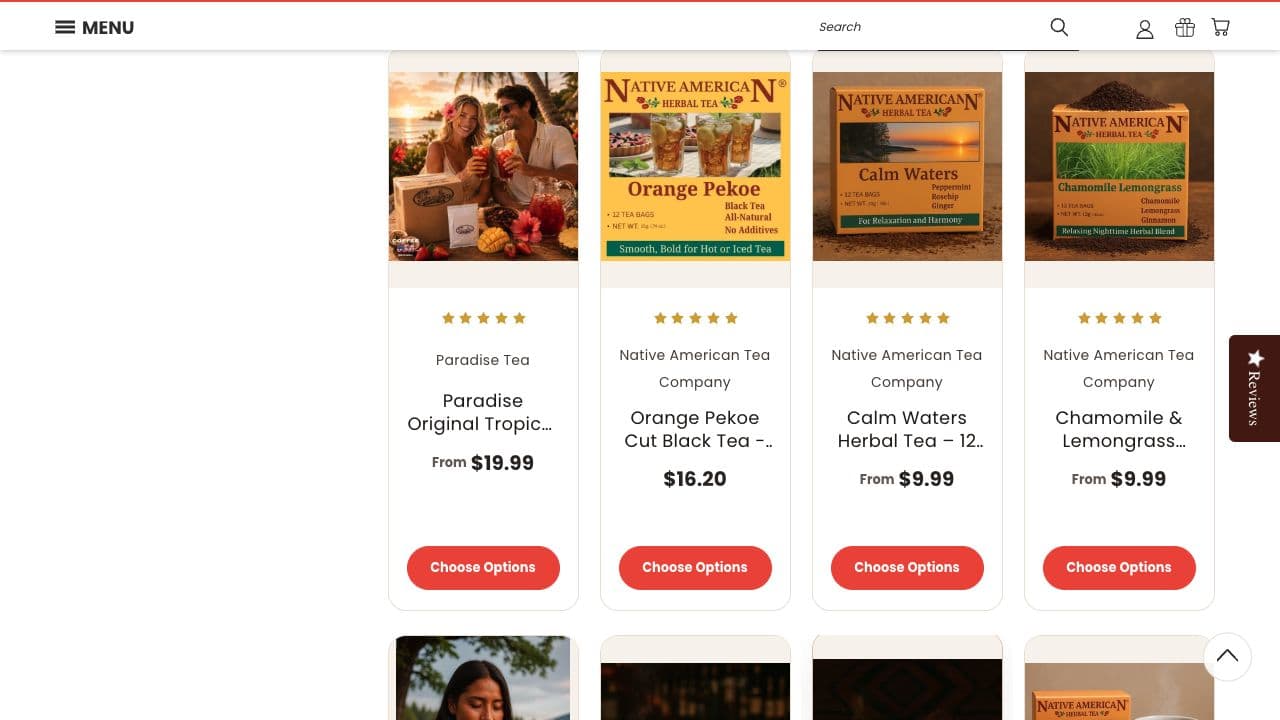
Revised tea category cards keep prices and the route to pack selection visible.
Homepage product cards and supporting storefront changes
We applied the same product-card treatment to the Featured, Most Popular and New Products carousels: bold black titles, larger prices, consistent image areas and visible buttons.
Products without options received “Add to Cart”. Products that require pack or purchase choices received “Quick View”, allowing customers to inspect those options before adding an item.
We also standardised filled review stars to gold across the homepage, category listings and product pages, retaining a lighter colour for empty stars. The cart popup’s “Continue Shopping” action now returns customers to the homepage to explore other product collections.
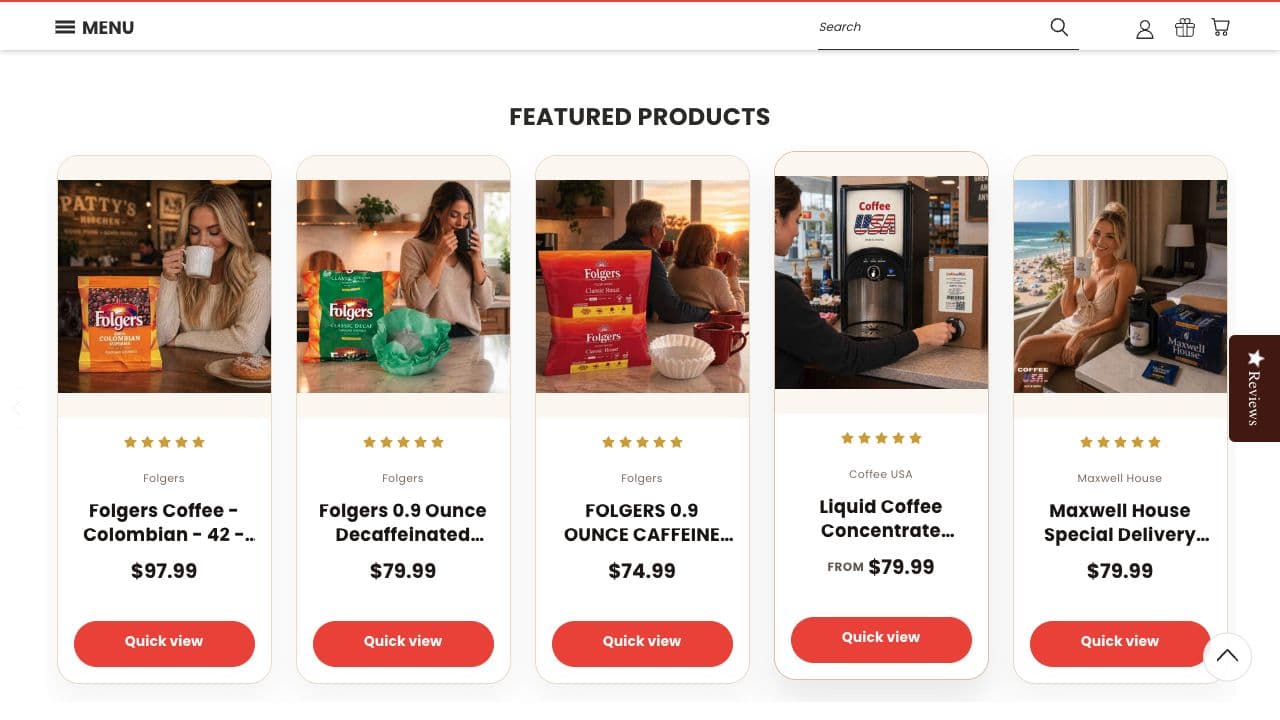
CoffeeUSA’s Featured Products carousel with the updated prices and purchase actions.
Commercial results: average order value increased by 21.9%
Coffee USA reported that most traffic came from organic search, with no active marketing campaigns during this work. The storefront changes focused on helping existing visitors select products, pack sizes and recurring purchases more easily.
In the sales report covering 5 July to 3 October, average order value increased by 21.9% compared with the report’s previous comparison period.
The subscription prompt gives repeat buyers a reason to consider a larger pack or bulk order: the 10% saving is visible while they choose how much to buy. A café or hotel planning regular replenishment can evaluate that saving against its ongoing supply needs. A repeat home customer can also choose a larger pack to make more of the recurring discount.
Coffee USA already receives bulk orders from B2B customers, so larger purchasing commitments are part of its business. Presenting the subscription saving beside pack selection supports that buying pattern and offers a plausible explanation for higher-value baskets.
The 21.9% uplift is a store-wide AOV result. The report does not isolate subscription orders or establish how much of the change came from the integration versus the mix of wholesale and retail purchases. Subscription uptake, renewal success, retention and AOV by customer type will help quantify that contribution over time.
The commercial takeaway is clear: average order value moved upwards, and the purchase interface now makes Coffee USA’s bulk options and recurring saving easier to assess together.
BigCommerce and PayWhirl FAQs
Does PayWhirl work with BigCommerce Native Checkout?
Yes. PayWhirl’s native integration uses BigCommerce selling plans so customers can buy subscriptions through the standard Optimized One-Page Checkout without a third-party checkout redirect. Recurring billing also requires a supported gateway with stored payment methods; Coffee USA switched to Braintree for that requirement.
Can customers combine subscription and one-time items in one cart?
Yes. The native selling-plan integration supports one-time products and subscription items in the same BigCommerce cart. A customer can buy coffee filters once and order tea on a monthly subscription in the same transaction.
How did you customise PayWhirl’s subscription selector in Cornerstone Light?
We restyled the Stencil product purchase area with separate one-time and auto-ship cards, a visible selection state and a 10% saving badge. Product option changes update the displayed subscription price for the selected pack, while quantity and Add to Cart stay grouped below the choices.
Can customers manage their own recurring subscriptions?
Yes. PayWhirl provides a customer portal that can be made available within a BigCommerce storefront. Customers can manage subscriptions and payment details through that portal, with the available actions controlled by the merchant’s settings.
PayWhirl documents the portal setup in its native checkout setup instructions.
What this implementation achieved for Coffee USA
Coffee USA’s subscription flow combines native BigCommerce checkout, Braintree stored payment methods and selling plans configured for each storefront. The customised Cornerstone Light theme makes the monthly 10% saving visible alongside the pack and quantity decisions that matter to both wholesale and retail customers.
The project also addressed clipped category cards, understated homepage prices and inconsistent purchase actions. Together, those changes give customers a clearer route from finding coffee or tea to placing a one-time or recurring order.
Need help with BigCommerce subscriptions?
Ravensdale Digital Services implements PayWhirl native checkout subscriptions and customises BigCommerce Stencil storefronts around payment requirements, product options and selling plans across stores.
Contact Ravensdale Digital Services to discuss your store, or explore our BigCommerce development services and subscription website design.
Need help with BigCommerce subscriptions?
Ravensdale Digital Services implements PayWhirl native checkout subscriptions and customises BigCommerce Stencil storefronts around payment requirements, product options and selling plans across stores.