Best Website Builders for Charities: WordPress vs Wix vs Squarespace vs Custom
How charities, churches, foundations and non-profit organisations can choose the right website platform for donations, trust, accessibility, content and long-term growth.
Jump to section
Choosing a website builder for a charity is not the same as choosing one for a normal small business.
A charity website has to do more than look professional. It must explain the mission clearly, build trust quickly, support donations, show impact, help people volunteer, publish updates, work well on mobile and remain manageable for a team that may include staff, trustees, volunteers or part-time administrators.
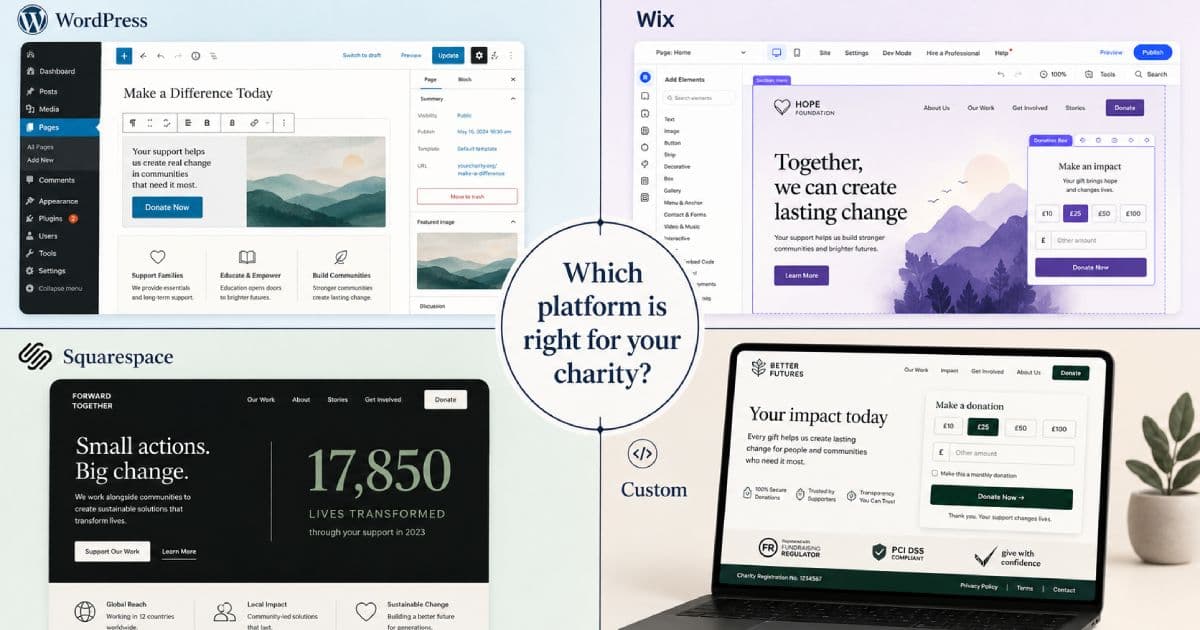
That makes platform choice important. WordPress, Wix, Squarespace and custom websites can all work for charities, but they fit different stages, budgets and operational needs.
This guide compares the main options so your charity, church, foundation, community organisation or non-profit team can choose a platform that fits the mission without creating unnecessary technical debt. It supports the same practical planning behind our charity website design work.
Quick answer: which website builder is best for charities?
There is no single best website builder for every charity.
| Charity situation | Best-fit option | Why |
|---|---|---|
| Small local charity with very limited budget | Wix | Fast to launch, simple editing, lower technical burden |
| Volunteer-led community organisation | Wix or Squarespace | Easy editing and lower setup complexity |
| Content-heavy charity or NGO | WordPress | Strong publishing, flexible pages, donation plugins, SEO control |
| Arts, culture or environmental charity | Squarespace | Strong visual templates and polished storytelling |
| Church or religious organisation | WordPress or custom | Useful for events, sermons, donations, ministries and resources |
| Grant-funded or established charity | WordPress or custom | Better control, SEO, governance, integrations and scalability |
| Charity with complex donations or CRM needs | Custom | More control over donation flows, data, integrations and user journeys |
| Multi-programme organisation | Custom or well-planned WordPress | Better structure for campaigns, reports, regions and teams |
For many charities, the best starting point is either Wix for a very simple site or WordPress for a more flexible, content-managed website. A custom website becomes more relevant when the charity needs stronger accessibility, donation flows, CRM integration, reporting, governance, multilingual content or a more distinctive user experience.
What a charity website actually needs to do
Before comparing platforms, define what the website must achieve.
A strong charity website should help people:
- Understand the mission quickly
- See who the organisation helps
- Trust the organisation
- Donate safely
- Volunteer or get involved
- Register for events
- Read news and impact stories
- Access reports and documents
- Contact the right person or team
- Confirm charity registration details where applicable
- Understand how funds are used
- Share campaigns with others
A platform that looks attractive but makes donations, updates or reporting difficult may become a problem later.
Essential pages every charity website should include
At minimum, most charity websites should include:
| Page | Purpose |
|---|---|
| Home | Explain the mission, impact and next step quickly |
| About / Our Mission | Build trust and explain why the charity exists |
| Our Work / Programmes | Show what the organisation actually does |
| Impact | Share outcomes, stories, reports and evidence |
| Donate | Make giving simple, secure and transparent |
| Get Involved / Volunteer | Help supporters contribute time, skills or resources |
| Events | Promote fundraisers, community events, talks or campaigns |
| News / Blog | Publish updates, stories and educational content |
| Reports / Governance | Share annual reports, policies and accountability information |
| Contact | Provide clear contact details and charity registration information where applicable |
| Privacy / Terms / Cookies | Support compliance and trust |
Not every charity needs every page at launch. But if donation, trust, volunteer recruitment and transparency matter, these pages should be planned early.
Platform comparison at a glance
| Factor | WordPress | Wix | Squarespace | Custom website |
|---|---|---|---|---|
| Ease of editing | Good with proper setup | Very easy | Easy | Depends on CMS |
| Setup speed | Medium | Fast | Fast | Slower |
| Design flexibility | High | Medium | Medium to high | Very high |
| Donation options | Strong via plugins or embeds | Basic to medium | Basic to medium via built-ins or embeds | Fully tailored |
| SEO control | Strong | Good for basics | Good for basics | Strong if implemented well |
| Accessibility control | High with the right build | Limited by templates/apps | Limited by templates/apps | Highest control |
| Ongoing maintenance | Needs updates and support | Lower technical burden | Lower technical burden | Needs developer support |
| Data ownership | Strong if self-hosted | More platform-dependent | More platform-dependent | Strong if planned properly |
| Best for | Growing charities and content-heavy NGOs | Small and volunteer-led groups | Visual storytelling charities | Established or complex organisations |
WordPress for charities
WordPress is often the strongest option for charities that need a flexible, content-managed website. Our WordPress development work often starts with the same questions: who will update the site, what content must be easy to manage, and how much flexibility the charity really needs.
It works well when a charity needs to publish regular updates, manage resources, create campaign pages, run events, support donations, build landing pages, grow SEO content and allow non-technical staff to update the site.
WordPress can support:
- Donation forms
- Campaign pages
- Blog and news publishing
- Resource libraries
- Events
- Volunteer forms
- Trustee or team pages
- Annual reports
- Multilingual content
- SEO plugins
- Accessibility-focused themes
- CRM and email marketing integrations
- Custom post types for programmes, projects or impact stories
WordPress is especially useful when the charity wants long-term control without being locked into a closed website builder.
When WordPress is a good fit
Choose WordPress if your charity:
- Publishes news, stories or reports often
- Needs stronger SEO control
- Wants flexible donation tools
- Needs multiple page types
- Has content that will grow over time
- Wants more ownership and portability
- Has a small budget for hosting and maintenance
- May need custom development later
- Wants to avoid being fully locked into a closed website builder
WordPress is a strong fit for charities that want a website to become a long-term digital hub, not just a simple online brochure.
WordPress watch-outs
WordPress can go wrong when it is built cheaply without planning.
Watch out for:
- Too many plugins
- Slow themes
- Poor hosting
- No update plan
- No backups
- No security hardening
- Confusing editing experience
- Donation plugins that are not configured properly
- Weak accessibility
- Poor image optimisation
- No staging site for changes
A well-built WordPress charity website can be fast, flexible and easy to update. A badly built one can become fragile and time-consuming.
Wix for charities
Wix is often a good starting point for small charities, grassroots groups and volunteer-led organisations that need to get online quickly.
Its main strength is simplicity. A volunteer or administrator can choose a template, edit pages visually, add basic forms and publish without needing to manage hosting, updates or plugins.
Wix may suit charities that need:
- A simple online presence
- A basic donation button or embedded donation form
- Simple event or campaign pages
- Volunteer enquiry forms
- A site maintained by non-technical users
- Lower technical responsibility
- A fast launch
Wix also has a nonprofit discount offer through TechSoup for eligible organisations in supported regions. Availability, eligibility and plan details can change, so charities should verify the current offer before making a decision.
Wix watch-outs
Wix can become limiting as a charity grows.
Common issues include:
- Less control over advanced content structures
- Less flexibility for complex donation journeys
- Platform lock-in
- More difficult migration later
- Limited custom workflows
- Less control over deep technical optimisation
- App dependency for extra features
- Less suitable for large resource libraries or complex campaign structures
Wix is best when simplicity matters more than long-term extensibility.
Squarespace for charities
Squarespace is a strong option for charities that rely heavily on visual storytelling.
It is popular with design-conscious organisations because the templates are polished, image-led and easier to make presentable without heavy design work.
Squarespace may suit:
- Arts charities
- Environmental charities
- Cultural organisations
- Community projects
- Small foundations
- Campaign microsites
- Story-led fundraising pages
- Organisations with strong photography
Squarespace provides website hosting and built-in tools, and its own nonprofit guide mentions using the `NONPROFIT` offer code for a discount on the first payment. Charities should still check the current terms at the time of signup.
Squarespace watch-outs
Squarespace is less flexible than WordPress or a custom build.
Watch out for:
- Limited custom functionality
- Less control over complex content types
- Donation tools that may rely on built-ins or third-party embeds
- Subscription costs over time
- Less portability than open-source setups
- Workarounds for advanced requirements
- Less suitable for complex programmes, portals or integrations
Squarespace can be a good choice when the site’s main job is to communicate beauty, trust, stories and campaigns clearly, rather than manage complex operations.
Custom charity websites
A custom charity website is designed and developed around the organisation’s specific needs.
This does not always mean building everything from scratch. It may mean a custom WordPress build, a headless CMS, a Next.js front end, a Laravel portal, a custom donation flow, or a structured platform that integrates with the charity’s existing tools.
Custom builds make sense when a charity needs:
- Complex donation journeys
- Recurring giving flows
- Multiple campaigns
- CRM integration
- Donor segmentation
- Volunteer portals
- Member portals
- Event registration
- Multilingual content
- Regional or chapter-based websites
- Strong accessibility control
- Custom reporting
- High-performance pages
- Complex governance or document libraries
- A distinctive brand experience
- Data ownership and portability
When a custom website is worth it
A custom charity website becomes worth considering when the current platform is limiting fundraising, content, governance or operations.
Signs your charity may be ready include:
- Donation journeys are too clunky
- Staff cannot manage content properly
- Funders expect stronger professional presentation
- The site has grown beyond the original structure
- Campaign pages are difficult to create
- Reports and resources are hard to organise
- The website is slow or unstable
- Integrations with CRM, email or payment tools are needed
- Accessibility needs are not being met
- The charity needs a more distinctive digital presence
For established charities, the website often becomes part of the organisation’s infrastructure. At that point, platform choice affects more than design.
Donation tools and payment flow
Donation flow is one of the most important parts of a charity website.
A good donation journey should be:
- Secure
- Mobile-friendly
- Easy to understand
- Fast to complete
- Clear about currency
- Clear about one-off versus recurring giving
- Clear about where money goes
- Trustworthy
- Compatible with regional requirements where applicable
- Easy to track
- Easy for the charity team to reconcile
Donation tools may include dedicated platforms, WordPress donation plugins, payment gateway embeds, CRM-integrated forms or custom flows.
For WordPress, donation plugins such as GiveWP or Donorbox can support more advanced fundraising workflows than a basic payment button. For Wix and Squarespace, donation embeds or built-in tools may be enough for simple campaigns, but charities should test the full donor experience carefully before launch.
Accessibility and inclusion
Accessibility is especially important for charities because supporters, beneficiaries, staff, volunteers and trustees may have different needs and devices.
A charity website should be designed around the WCAG principles:
- Perceivable
- Operable
- Understandable
- Robust
In practical terms, that means paying attention to:
- Colour contrast
- Keyboard navigation
- Focus states
- Screen reader support
- Descriptive link text
- Form labels
- Error messages
- Captions and transcripts
- Alt text
- Text size
- Mobile usability
- Clear language
- Avoiding inaccessible PDFs where possible
A custom build gives the most control, but WordPress, Wix and Squarespace can all be made better or worse depending on the template, content and implementation choices.
SEO and AI search considerations
Charity websites often need to be found for mission-related, local, programme, fundraising and support searches.
Examples:
- homeless charity in Cape Town
- youth mentoring charity South Africa
- donate to education charity
- church food pantry near me
- animal rescue adoption events
- volunteer opportunities in Gqeberha
- community development NGO reports
A strong charity website should support:
- Clear page titles and descriptions
- Useful programme pages
- Campaign landing pages
- Impact stories
- News and updates
- Organisation structured data
- Event structured data where appropriate
- Clear author or team attribution
- Internal links
- Optimised images
- Accessible content
- Fast mobile performance
- Accurate contact and registration details
Google’s Organisation structured data can help search engines understand administrative details such as the organisation’s name, logo, contact information and sameAs profiles when implemented correctly. It should match visible page content, and broader SEO services should still focus on useful pages, accessibility, internal links, metadata and trustworthy information.
For charities preparing for AI-assisted search, the same principles apply: clear entity information, visible trust signals, useful programme pages and verifiable content. Our GEO services build on those foundations without promising automatic AI recommendations.
Platform decision guide
Use this table to narrow the decision.
| Requirement | Best option |
|---|---|
| Fast low-budget launch | Wix |
| Volunteer-managed basic site | Wix or Squarespace |
| Strong visual storytelling | Squarespace |
| Regular blogs, reports and resources | WordPress |
| Donation campaigns and flexible content | WordPress |
| Events and community updates | WordPress or Squarespace |
| Multilingual or multi-programme site | WordPress or custom |
| Strong accessibility control | Custom or carefully built WordPress |
| CRM and email automation integration | WordPress or custom |
| Custom donation flow | Custom |
| Long-term ownership and portability | WordPress or custom |
| Highly distinctive brand and UX | Custom |
Common charity website mistakes
Avoid these mistakes:
- Using a free subdomain for a serious charity website
- Running donation pages without HTTPS
- Hiding the donate button
- Not explaining how funds are used
- Publishing outdated reports
- Using inaccessible PDF-only content
- Forgetting mobile donors
- Making volunteer forms too long
- Using vague impact claims without evidence
- Forgetting charity registration details where applicable
- Not tracking donation, volunteer and enquiry conversions
- Choosing a platform only because it is cheap
- Choosing a custom build without a maintenance plan
What to ask before choosing a platform
Before choosing WordPress, Wix, Squarespace or custom development, ask:
| Question | Why it matters |
|---|---|
| Who will update the website? | Determines how simple the CMS must be |
| How often will content change? | Affects publishing and workflow needs |
| Do we need online donations? | Determines payment and fundraising requirements |
| Do we need recurring donations? | Affects donation platform choice |
| Do we need event registration? | Affects integrations and forms |
| Do we need CRM integration? | May rule out simpler builders |
| Do we need multilingual content? | Affects platform and content structure |
| Do we need strong accessibility control? | Affects design and development choices |
| What reports or governance documents must be published? | Affects content architecture |
| What happens if we outgrow the platform? | Affects portability and long-term cost |
Recommended starting points
Here is a simple way to think about it:
- Choose Wix if the charity is small, volunteer-led and needs a basic site quickly.
- Choose Squarespace if the charity is visual, story-led and does not need complex functionality.
- Choose WordPress if the charity needs publishing, SEO, donation flexibility, resources, events and room to grow.
- Choose custom if the charity has complex workflows, integrations, accessibility requirements, multi-programme structures or serious fundraising needs.
If the organisation needs donation notifications, CRM handoffs, email journeys, volunteer workflows or reporting, plan automation and integrations early instead of treating them as an afterthought. Whichever platform you choose, budget for website maintenance so updates, backups, forms, security and content accuracy are not ignored after launch.
Final thoughts
The best website builder for a charity is the one that supports the mission without overwhelming the team.
A small grassroots project may be perfectly fine on Wix. A design-led arts charity may do well on Squarespace. A growing NGO may need WordPress. An established fundraising organisation may eventually need a custom website that connects donations, CRM, reporting, accessibility and content strategy.
The key is to choose for the charity’s real operating needs, not only the cheapest monthly fee or the prettiest template.
Need a charity website that builds trust and supports action?
Ravensdale Digital Services builds charity websites for non-profits, churches, foundations, community organisations and mission-led teams that need clearer messaging, better donation journeys, stronger trust signals and a website that can grow with the organisation.
Sources and further reading
- Wix Support: Premium plan discount for charities or non-profit organisations
- TechSoup South Africa: Wix for Nonprofits
- Squarespace Support: Building a nonprofit site
- WordPress.org: Features
- WordPress.org: Plugins
- Google Search Central: Organisation structured data
- Google Search Central: Structured data introduction
- W3C Web Accessibility Initiative: WCAG overview
- GiveWP: WordPress Donation Plugin
- Donorbox: Donation forms and hosted donation pages
FAQs
What is the best website builder for a small charity?
For a very small charity with limited budget and no technical support, Wix can be a sensible starting point. It is easy to edit and quick to launch. If the charity expects to publish content regularly or grow its fundraising activity, WordPress may be a better long-term choice.
Is WordPress good for charity websites?
Yes. WordPress is a strong option for charities that need flexible content, donation plugins, campaign pages, reports, events, SEO control and long-term ownership. It does need hosting, updates, backups and maintenance.
Is Wix good enough for a charity website?
Wix can be good enough for small charities, community groups and volunteer-led organisations that need a simple website quickly. It may become limiting if the charity needs complex donation flows, resource libraries, advanced SEO, CRM integration or migration flexibility.
Is Squarespace good for charities?
Squarespace can work well for charities that rely on visual storytelling, such as arts, culture, environmental or campaign-led organisations. It is less flexible than WordPress or a custom build for complex content structures, donation workflows and integrations.
When should a charity choose a custom website?
A custom charity website is worth considering when the organisation needs complex donation journeys, CRM integration, member or volunteer portals, multilingual content, strong accessibility control, custom reporting or a more distinctive digital experience.
Should a charity use a free website builder?
A free website builder can help with a temporary early-stage presence, but it is usually not ideal for a public charity website. Generic domains, third-party branding, limited controls and weaker trust signals can create problems when asking for donations or grant support.
What should a charity donation page include?
A donation page should include a clear reason to give, secure payment flow, one-off and recurring options where relevant, suggested amounts, transparency about impact, contact information, privacy information and a clear confirmation message after donation.
Does the website platform affect charity SEO?
Yes, but implementation matters more than the brand name of the platform. WordPress and custom builds usually give more control, while Wix and Squarespace can cover many basics. Strong SEO depends on useful content, technical quality, accessibility, internal links, metadata, structured data and consistent publishing.
Need a charity website that builds trust and supports action?
Ravensdale Digital Services builds charity websites for non-profits, churches, foundations, community organisations and mission-led teams that need clearer messaging, better donation journeys, stronger trust signals and a website that can grow with the organisation.